Tool
Raffle ticket generator
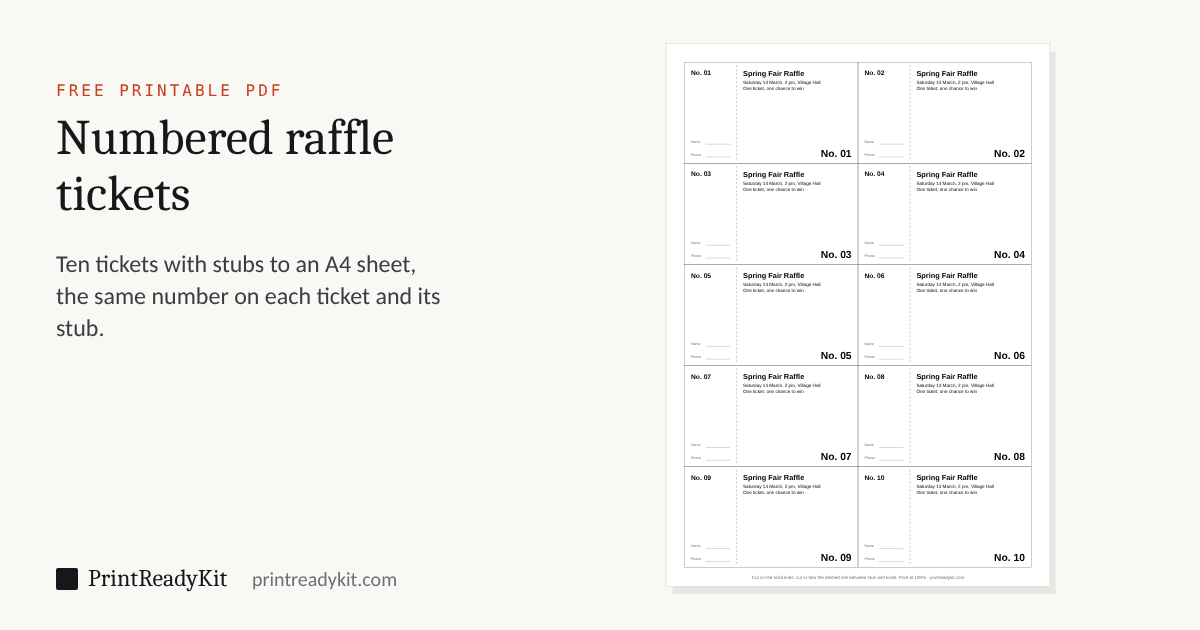
Numbered tickets with a stub, ready to print: choose the first number and how many, 8 to 16 on an A4 or Letter sheet, and add the event, the date and the price. Every ticket and its stub carry the same number, and the numbers can run in order down each pile once the sheets are cut. For raffles, tombolas, door prizes, cloakrooms and coupons. Nothing is uploaded.
Numbers
Sheet
On every ticket
100 tickets, No. 001 to No. 100, on 10 sheets of A4, 10 per sheet. Each ticket 95 × 55 mm (3.74 × 2.18 in), stub included.
The preview shows sheet 1 of 10; the PDF has every sheet. The SVG is sheet 1 only.
Printing and cutting
- Print the PDF at Actual size (100%), one side only. Print one sheet first to check the text.
- Keep the sheets in the order they come out of the printer, especially for numbers in order after cutting.
- Cut along the solid lines — the whole pile at once with a guillotine, or a few sheets at a time with a ruler and knife.
- Cut, score or perforate the dashed line between each stub and its ticket.
Keeps these settings in the link. Useful for moving from a phone to the computer with the printer on it.
Frequently asked questions
How do I make numbered raffle tickets?
Enter the first number and how many tickets you need, choose how many go on a sheet, and type the event, the date and the price if you want them on the ticket. The PDF numbers every ticket and its stub with the same number, on as many sheets as it takes. Print it at Actual size, cut along the solid lines and separate each stub from its ticket along the dashed line.
How many raffle tickets fit on an A4 or Letter sheet?
Choose 8, 10, 12 or 16 per sheet. The tickets fill the sheet inside a 10 mm margin that most home printers can print, so their size follows from the choice — 8 per sheet: 95 × 69 mm on A4, 3.86 × 2.55 in on Letter; 10 per sheet: 95 × 55 mm on A4, 3.86 × 2.04 in on Letter; 12 per sheet: 95 × 46 mm on A4, 3.86 × 1.70 in on Letter; 16 per sheet: 95 × 35 mm on A4, 3.86 × 1.28 in on Letter. The stub takes the left 30% of each ticket.
How do I number tickets so they stay in order after cutting?
Choose "In order after cutting the pile". Print, stack the sheets in the order they come out, and cut the whole pile at once: each pile of tickets then runs in sequence. For 100 tickets at 10 per sheet, the first pile is 1 to 10 and the second 11 to 20, and so on across the sheet. "In order on each sheet" numbers 1, 2, 3 across each sheet instead, which is easier to check on screen and leaves the cut piles mixed.
What paper should I print raffle tickets on?
Thin card of about 160–200 gsm (60–75 lb cover) handles and tears like a bought ticket; copier paper works for a small draw. Check the heaviest paper your printer takes — many home printers accept card only through a rear or manual feed — and print one sheet first. Coloured paper or card makes it easy to tell one draw’s tickets from another’s.
How do I separate the stub from the ticket?
Cut along the dashed line with a ruler and a craft knife, or score it first and fold it back and forth a few times so it tears cleanly when the ticket is sold. A paper trimmer with a perforating blade does a whole stack of stubs at once. Write the buyer’s name and phone on the stub, keep it in the draw, and give the ticket to the buyer.
Can I use accents, Greek or Cyrillic in the event name?
Yes. When the text needs it, the PDF embeds a font with Latin accents, Greek and Cyrillic. Characters it cannot print, such as Chinese, Japanese or emoji, are named under the text fields before you download, rather than printing as something else.
Is what I type sent anywhere?
No. The tickets are drawn in your browser and nothing is uploaded. A link made with "Continue on another device" carries the numbering and the layout, never the event name or the other text you typed.
Last updated