Tool
How many fit on a sheet?
Give the size of what you are printing and see how many fit, how to arrange them, and how much paper is left over — then download a sheet with the cut guides already drawn.
Gap 0 shares one cut line between neighbours — fewer cuts, no waste strip, and it fits more. Use 3–5 mm if you are cutting by hand or the design bleeds to the edge.
Per sheet
9
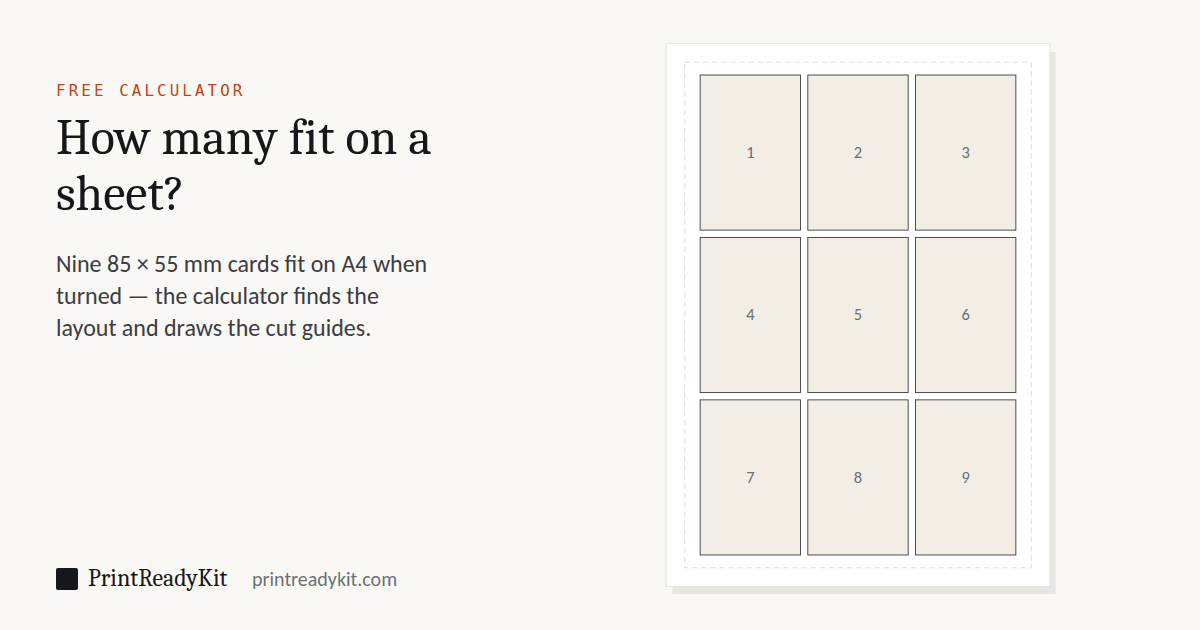
3 across × 3 down · turned 90°
Paper used
67%
33% is margin, gaps and offcut
Drawn to scale. Dashed line is the 10 mm printer margin.
Print at 100% / Actual size. Fit to page rescales the sheet to the printer's printable area, so every item comes out small by however much that area differs from the page — and nothing lines up. The calibration test confirms your printer in one page.
Keeps these settings in the link. Useful for moving from a phone to the computer with the printer on it.
Why orientation and gap change the count
The calculator tries the item both ways round and keeps whichever fits more, which is usually not the way you drew it. A standard 85 × 55 mm card upright gives eight per A4; turned sideways it gives nine, in a 3 × 3 grid. That is 12.5% more cards per sheet, and it costs nothing but rotating the artwork. For a fixed order quantity the sheets you save depend on rounding up to whole sheets, so the saving is a little less than the headline figure.
The gap matters as much. Set it to zero and neighbouring items share a cut line: one pass of the guillotine separates two pieces, and the sheet holds more. A gap is only needed when each item has its own bleed, or when you are cutting by hand and want room for error. Between those two settings — orientation and gap — the same sheet can hold anywhere from six to ten of the same card.
Round items follow the same arithmetic. A circle occupies the same grid cell as a square of the same diameter, so the count is identical to a square of that size — what changes is the cut, since circles need a punch or a die rather than a guillotine.
Frequently asked questions
How many A6 fit on an A4 sheet?
Four, if you are cutting the sheet down: A6 is A4 halved twice, so four fill it exactly with no waste — set the margin and gap above to 0 and pick A6 as the item. A printer changes the answer. With the 10 mm margin most home printers need and a 4 mm gap to cut between, only 2 fit, because the printable area is no longer a whole A4. The same halving gives 8 A4 sheets from one A1, and two of any A-size from the next size up.
How many business cards fit on an A4 sheet?
Nine, in a 3 × 3 grid, when the standard 85 × 55 mm European card is turned sideways and a 10 mm printer margin is kept clear. Left upright it drops to eight, because the sheet then only takes two across. US cards at 89 × 51 mm give eight on Letter with the same margin and 4 mm gap, or ten if you close the gap so neighbouring cards share a cut line. The calculator above shows the arrangement rather than just the number, because the orientation is the part people get wrong.
How many 5 × 7 photos fit on A4 or Letter?
Two on A4 and two on Letter, turned sideways, with a 10 mm margin and a 4 mm gap to cut between. A 5 × 7 in print is 127 × 178 mm, so a single one fills most of the width and only the length has room for a second. Choose "Photo 5 × 7 in" above to see the arrangement and print the cut guides.
How many 3 × 5 index cards fit on a sheet?
Four on A4 and four on Letter, two across and two down, with the default margin and gap. The same answer holds for 3 × 5 in flash cards, which are index cards by another name. Print on card stock of about 160–200 gsm (roughly 60–75 lb cover) if they will be handled.
How many playing cards fit on one sheet?
A poker-size card is 2.5 × 3.5 in (63.5 × 88.9 mm). With a 10 mm margin and a 4 mm gap, eight fit on A4 and six on Letter. The familiar sheet of nine in a 3 × 3 grid needs the gap closed and the margin down to 5 mm, because the grid alone is 190.5 × 266.7 mm — set both above and it appears, on A4 and on Letter alike. Check first that your printer can print that close to the edge.
How many squares fit on an A4 sheet?
15 squares of 5 × 5 cm (three across, five down) and 54 of 3 × 3 cm (6 × 9), with a 10 mm printer margin and the squares touching, so one cut serves two edges. With a 4 mm gap to cut between, 5 cm squares still give 15 on A4, while 3 cm squares drop to 40. On Letter, 5 cm squares give 15 touching and 12 with the gap. Choose "Square 5 × 5 cm" above or type any size: tiles, boxes, stickers and cut-outs all follow the same arithmetic.
How many stickers fit on a sheet?
It depends only on the sticker size and how you cut. Rectangular 7 × 3 cm stickers give 18 on A4 butted together for a trimmer, or 16 with a 4 mm gap for cutting by hand; on Letter, 18 and 15, turned sideways. For round stickers choose Circle above and enter the diameter. To print text on a sticker sheet, the label sheet generator lays out every sticker with its text as a PDF.
How many flash cards fit on A4 if I laminate them?
Leave a sealed edge of about 3 mm of laminate around every card, or the pouch can peel open where you cut, so set the gap between cards to at least 6 mm. A7 flash cards (74 × 105 mm) with that gap give four on A4 and four on Letter: the same as with no gap, because the 10 mm printer margin is what limits them. 3 × 5 in cards give four on A4 and three on Letter. Laminate the whole printed sheet, then cut along the guides this tool draws.
Why does turning the item fit more?
Because a sheet is rarely a whole multiple of an item in either direction, and the leftover differs by orientation. An 85 mm card across a 190 mm printable width leaves 20 mm wasted; turned, 55 mm divides into 190 three times with 25 mm spare but gains a whole extra row down the length. The calculator tries both and keeps the better, telling you when it turned the item.
Should I leave a gap between items or let them touch?
Let them touch when you will cut with a guillotine or trimmer: one straight cut serves both neighbours, there is no waste strip, and the layout fits more. Leave a gap of 3–5 mm when cutting by hand with scissors, when the design has a background that runs to the edge and needs bleed, or when slight misalignment would be visible. The tool draws different guides for each: continuous lines for touching items, individual outlines with crop marks when there is a gap.
What margin should I set?
Ten millimetres is safe on essentially every home printer and is the default here. Most machines can reach a little closer, often 3–5 mm, but not reliably and rarely at the trailing edge — and a layout that assumes more than the printer delivers loses its bottom row entirely. If you know your printer’s real printable area, use that; otherwise keep 10 mm and accept one fewer row.
Does this work for photos and postcards?
Yes — anything rectangular. A 10 × 15 cm photo gives two per A4, a 4 × 6 inch photo the same, and A6 postcards two per sheet. For photographs, check the resolution holds at the printed size before committing a sheet of photo paper: our image quality analyser reports the effective PPI for any target size.
Why does the print come out slightly wrong even though the layout is right?
Almost always print scaling. If the dialog is set to Fit to page rather than Actual size, the whole sheet shrinks by 3–6% and every item with it — cards come out at 82 × 53 mm instead of 85 × 55, and pre-cut stock no longer aligns. Print at 100% and verify once with our calibration sheet before running a batch.
How many A4 fit in A2, A1 or A0
This is the one layout question with an exact answer, and the calculator above is the wrong tool for it. ISO sizes are defined by halving: an A3 is an A2 folded once, an A4 is an A2 folded twice. No printer margin, no arrangement to optimise — the number is fixed by the standard.
| Question | Answer | Because |
|---|---|---|
| How many A4 in A0? | 16 | 841×1189 ÷ 210×297 |
| How many A4 in A1? | 8 | 594×841 ÷ 210×297 |
| How many A4 in A2? | 4 | 420×594 ÷ 210×297 |
| How many A4 in A3? | 2 | 297×420 ÷ 210×297 |
| How many A5 in A4? | 2 | 210×297 ÷ 148×210 |
| How many A6 in A4? | 4 | 210×297 ÷ 105×148 |
| How many A6 in A3? | 8 | 297×420 ÷ 105×148 |
| How many A6 in A2? | 16 | 420×594 ÷ 105×148 |
The reverse needs more care. An A0 sheet has about the area of 16 A4 sheets, but a tiled A0 poster does not print on 16 A4 pages. Each page loses its unprintable margin, and any overlap you add for alignment is paid for twice — once on each neighbouring sheet. With no margin and no overlap the poster splitter returns 18 sheets; at its defaults of 5 mm margin and 10 mm overlap it returns 21. Run your own settings through it rather than working from the area.