Size comparison
A4 vs US Letter
Letter (8.5 × 11 in / 215.9 × 279.4 mm) is about 6 mm wider; A4 (210 × 297 mm) is about 18 mm taller. Neither contains the other, their aspect ratios differ, and each is the immovable default on its side of the Atlantic — so documents that cross between them need either scaling or margins designed for both. The size converter gives the exact percentage in each direction, which is the number the print dialog wants when a document arrives on the wrong continent.
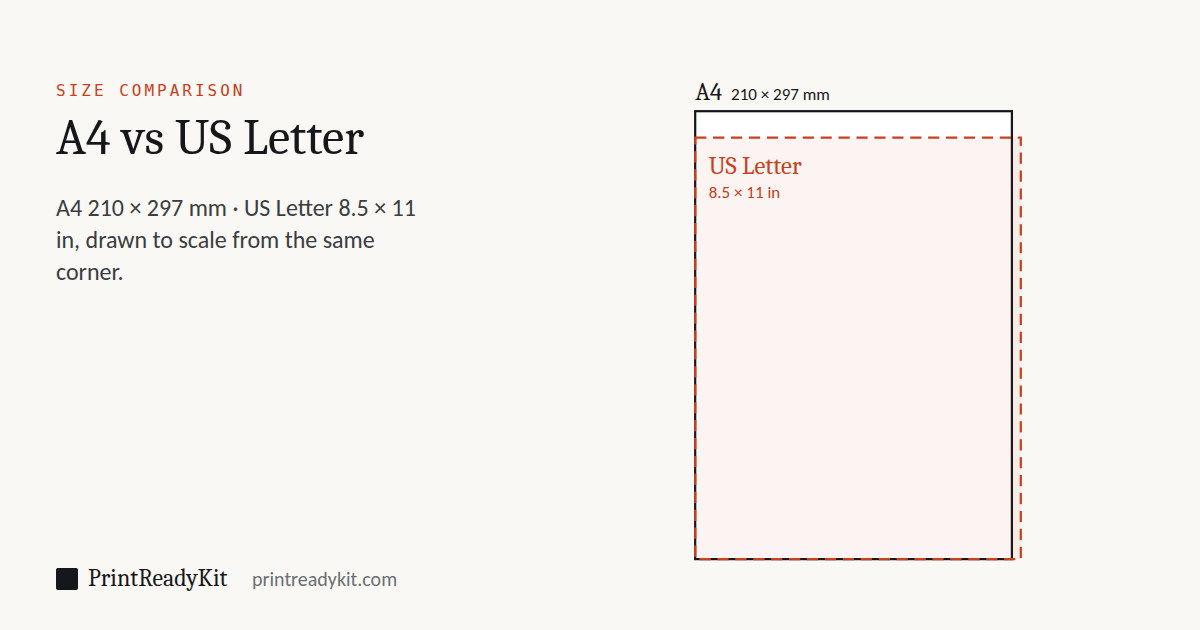
Both sheets drawn at the same scale and aligned at the top-left corner: the dashed Letter sheet sticks out to the right, the solid A4 sheet sticks out at the bottom.
Side-by-side dimensions
| Property | A4 | US Letter |
|---|---|---|
| Millimetres | 210 × 297 | 215.9 × 279.4 |
| Inches | 8.27 × 11.69 | 8.5 × 11 (exact) |
| Pixels @ 300 DPI | 2480 × 3508 | 2550 × 3300 (exact) |
| Pixels @ 96 DPI | 794 × 1123 | 816 × 1056 (exact) |
| Area | 623.7 cm² (+3.4 %) | 603.2 cm² / 93.5 in² |
| Aspect ratio | 1 : 1.414 (√2) | 1 : 1.294 |
| Standard | ISO 216 | ANSI/ASME Y14.1 (ANSI A) |
| Reference page | Full A4 guide | Full Letter guide |
Printing across the two formats
The mismatch is asymmetric, so each direction has its own number:
A4 file → Letter paper
Height is the constraint. "Fit to page" scales to 94 % (279.4 ÷ 297); text shrinks slightly and thin side bars appear. Printed at 100 % instead, the bottom ~18 mm of the layout is cut off — footers and page numbers go first.
Letter file → A4 paper
Width is the constraint. "Fit" scales to 97 % (210 ÷ 215.9) — barely visible. At 100 %, about 3 mm is clipped from each side when centred; edge-aligned logos and side tabs are the casualties.
The universal layout box: the footprint shared by both sheets is 210 × 279.4 mm — A4's width by Letter's height. Design inside that box with a normal printer margin on top (≥ 20 mm on an A4 layout, ≥ 0.8 in on a Letter layout) and the same file prints complete on either paper at 100 %, no scaling and no reflow. International CVs, contracts and forms should be built this way by default.
Use A4 when…
- The audience is outside North America
- Applying to European, UK or international organisations
- The document joins an ISO-standard filing system (A-series folders)
- It will be scaled to A5 booklets or A3 posters (same 1:√2 ratio)
Use Letter when…
- The audience is in the US, Canada or Mexico
- Résumés and school work for North American recipients
- Recipients will print it on default US office printers
- It pairs with Legal or Tabloid documents in the ANSI family
Frequently asked questions
Are A4 and US Letter the same size?
No. A4 is 210 × 297 mm (8.27 × 11.69 in); Letter is 215.9 × 279.4 mm (8.5 × 11 in). Letter is about 6 mm wider, A4 about 18 mm taller. Neither fits inside the other, which is exactly why printing across the two formats needs care.
Which is bigger, A4 or Letter?
It depends on the axis: Letter is wider, A4 is taller. By area, A4 is slightly bigger — 623.7 cm² versus 603.2 cm², about 3.4 % more.
Can I print an A4 document on Letter paper?
Yes, with "Fit to page": the dialog scales the A4 layout to 94 % (279.4 ÷ 297) so its greater height fits, leaving small side bars from the width difference. At 100 % instead, the bottom ~18 mm of the A4 layout falls off the sheet.
Can I print a Letter document on A4 paper?
Yes — "Fit" scales it to 97 % (210 ÷ 215.9) so the extra width fits, with a little spare height. At 100 %, roughly 6 mm is clipped from the width (3 mm a side when centred).
How do I design a document that prints on both?
Keep every element inside the shared footprint of the two sheets: 210 mm wide (the A4 width) by 279.4 mm tall (the Letter height). Add a normal printer margin on top of that — in practice, uniform margins of at least 20 mm on an A4 layout, or 0.8 in on a Letter layout, survive both formats at 100 % without clipping.
Why do the two standards exist at all?
They evolved independently: 8.5 × 11 was standardised in the US in the early 20th century and made the single federal size in the 1980s, while the metric world adopted ISO 216 (A4) with its 1:√2 ratio. By the time either side might have switched, billions of files, folders, trays and templates were locked in.
How do I change the paper size in Word or Google Docs?
Word: Layout → Size → A4 or Letter. Google Docs: File → Page setup → Paper size. Watch the default: US-locale installs default to Letter, most others to A4 — the usual reason a document "mysteriously" reflows when a colleague abroad opens it.
Do A4 and Letter have the same aspect ratio?
No — and this is the deeper difference. A4 is 1 : 1.414 (√2), Letter is 1 : 1.294. Scaling between them always changes the margins: a uniform scale that fixes one axis leaves a gap or overflow on the other.
What are you trying to do?
Most people looking up A4 are partway through something else. These open with the size already set.
- Check a photo is sharp enough for A4Drop in the image and see its effective resolution at this size.
- Print it at exactly A4Where the 100% setting hides, and why Fit to page changes the scale at all.
- Convert to pixels, points or inchesEvery unit at any DPI, plus photocopier scaling percentages.
- See every standard size at onceAll 48 sizes in one table, with a printable PDF chart.