Tool
Envelope address printer
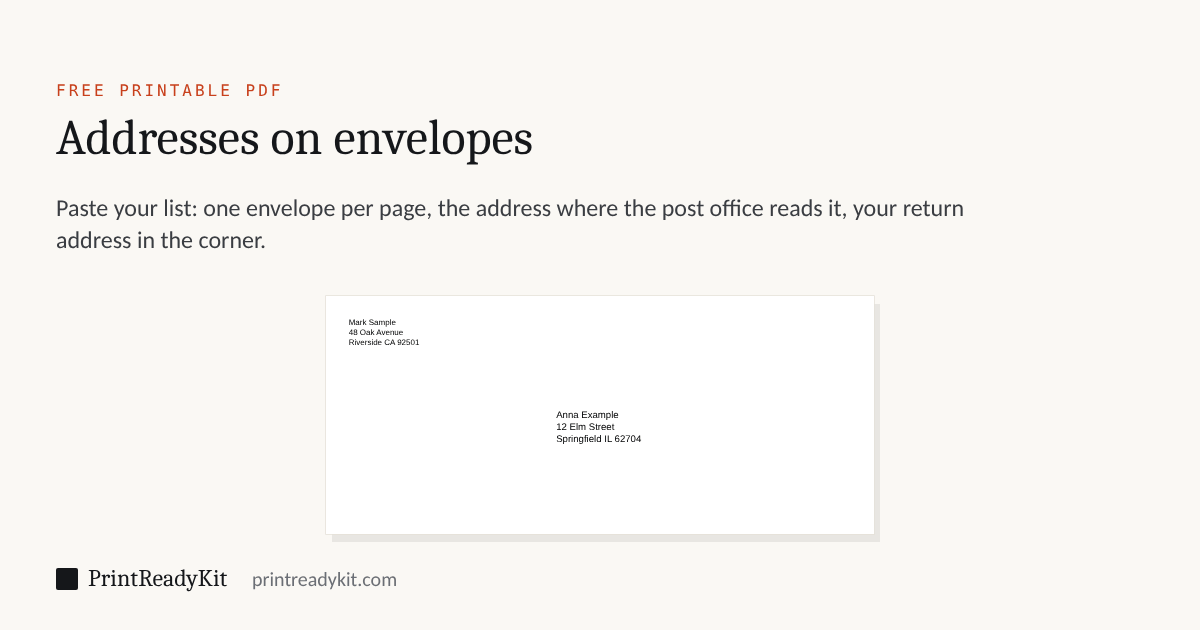
Print addresses straight onto envelopes: paste your list, choose the envelope, and get a PDF with one envelope per page, each page the size of the envelope, the address where the post office reads it and your return address in the corner. DL, C5, C6, US #10, A7 invitation envelopes or your own size. Your addresses never leave this page.
Addresses
Envelope
DL, 220 × 110 mm. Add addresses to fill the envelopes; without them the PDF is one envelope with your return address. In the print dialog choose this envelope as the paper size and print at Actual size (100%).
The grey address is a sample; yours replaces it.
Printing on envelopes
- In the print dialog, choose the envelope as the paper size (DL, C5, #10 and the others are listed by most printers) and print at Actual size or 100%.
- Find the envelope picture on your printer’s tray or in its manual: it shows which side faces up and which edge goes in first. Most printers take envelopes in the rear or manual feed, with the flap closed.
- Print the first page on a sheet of paper cut to the envelope’s size, or on a sheet with one corner marked, and check where the address lands before printing the rest.
- Print the rest in small batches, so the envelopes feed straight.
Where the address goes
The address runs along the long side, a little to the right of centre and below the middle, where letter-sorting machines read it: the US Postal Service reads an address no higher than 2¾ inches above the bottom edge and at least ½ inch from the sides, and Deutsche Post asks for the lower right part of the front, at least 15 mm from the sides and the bottom and 40 mm from the top. The stamp goes in the top right corner, so the return address sits in the top left, smaller. If your envelope has a pattern or a window in the way, move the address with the two fields under the envelope size.
Making the envelopes as well? The envelope template generator folds one from a sheet for any card size. Prefer labels? The label sheet generator prints the same list on address labels, 30 or 21 to a sheet.
Keeps these settings in the link. Useful for moving from a phone to the computer with the printer on it.
Frequently asked questions
How do I print an address on an envelope?
Type or paste the address, choose the envelope size, and download the PDF: its page is exactly the size of the envelope, with the address where the post office reads it. In the print dialog choose the same envelope size as the paper size and print at Actual size or 100%, then feed the envelope the way your printer’s tray or manual shows. Print the first one on a sheet of paper cut to the same size to check where the address lands.
How do I print addresses on many envelopes at once?
Paste the whole list with a blank line between addresses, or copy rows from a spreadsheet, one address per row. The PDF has one page per envelope, so printing it prints them in order. Most home printers take a few envelopes at a time in the rear or manual feed; print in batches and keep the stack square.
Which way does the envelope go into the printer?
It depends on the printer, which is why the tray or the inside of the cover usually has a small envelope picture: it shows which side faces up and which edge goes in first. Mark one corner of a sheet of paper, print the first page on it, and the mark tells you how to turn the envelope. Most printers want the flap closed for printing.
What size is a DL, C5 or #10 envelope?
DL is 220 × 110 mm, for A4 folded in three; C5 is 229 × 162 mm, for A4 folded once; C6 is 162 × 114 mm, for A4 folded twice. A US #10 is 9½ × 4⅛ in, for Letter folded in three, and the A7 invitation envelope is 7¼ × 5¼ in, for 5 × 7 in cards. Any other size can be entered as a custom size.
Where should the address and the return address go?
The delivery address goes on the front, parallel to the long side, a little below the middle and to the right of centre: that is where letter-sorting machines read it, and in the US it must sit no higher than 2¾ inches above the bottom edge. The stamp goes in the top right corner, so the return address goes in the top left, smaller. The PDF puts both there; you can move the delivery address if your envelope has a design in the way.
Can I print just my return address on envelopes?
Yes. Leave the address list empty and type only the return address: the PDF has one envelope with the return address in the top left corner. Print as many copies as you need from the print dialog.
Are the addresses sent anywhere?
No. The envelopes are drawn in your browser and nothing is uploaded. A link made with “Continue on another device” carries the envelope size and the position of the address, never the addresses themselves.
Last updated
Related
- Envelope template generatorFold an envelope for any card
- Label sheet generatorThe same list on address labels
- Envelope finderWhich envelope takes your sheet
- DL envelope size220 × 110 mm, for A4 in thirds
- Print at actual sizeSo the address lands where it should
- How to print on envelopesWhich way they go in, and how to write the address