Tool
Printer test page
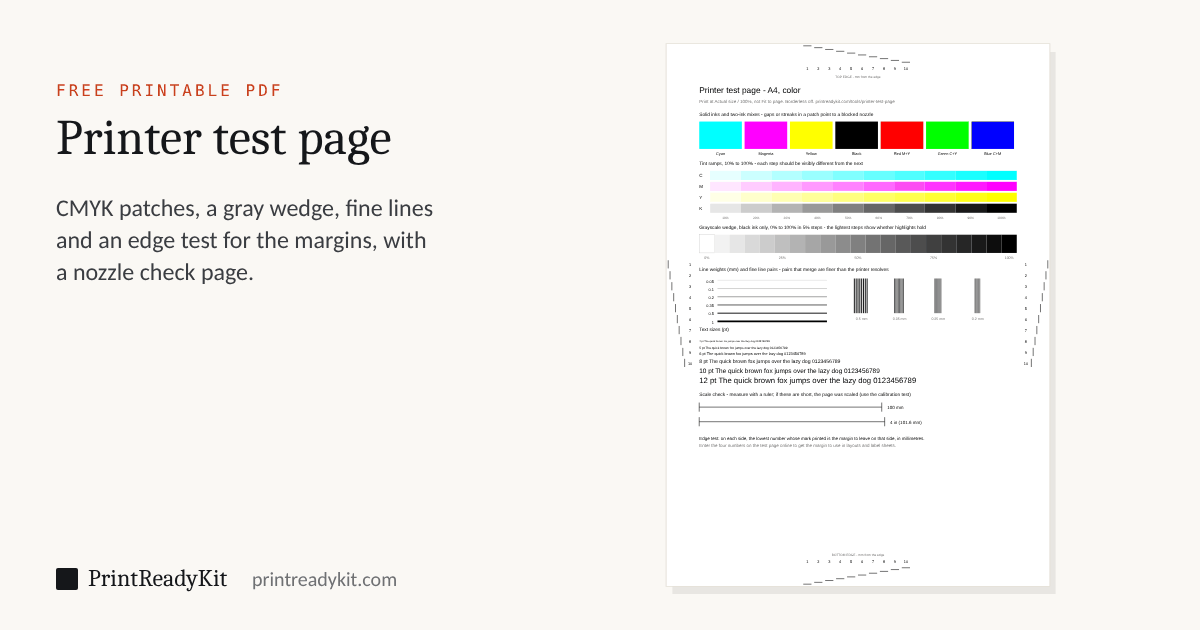
One page that checks a printer properly: each ink on its own, tint ramps, a grayscale wedge, line weights, fine detail, small text and a 100 mm scale check — plus marks round the edge that measure how close to the edge of the paper your printer can actually print. A second page checks the nozzles and the head alignment. Free PDFs for A4 or US Letter, as a color test page or in black and white.
Step 1
Print the test page
- Print the PDF at Actual size or 100%, never Fit to page.
- Turn borderless printing off; it enlarges the page and hides the edge test.
- Use the paper size you chose above.
Step 2
Read the edge test
On each side of the printed page, find the lowest number whose mark actually printed.
What each part of the page shows
- Solid inks and mixes. Streaks or white lines in a patch mean a blocked nozzle; a color that looks wrong in a mix but right on its own points to one cartridge.
- Tint ramps and grayscale wedge. Each step should differ from its neighbors. Steps that merge at the light end lose highlights; at the dark end, shadows.
- Line weights and line pairs. The finest line that prints unbroken, and the finest pairs that stay separate, are the detail your printer resolves.
- Text sizes. The smallest size you can read without it filling in is the practical floor for small print on this printer.
- Scale check. The lines should measure 100 mm and 4 inches. If they are short, the page was scaled; the calibration test gives the exact percentage.
The nozzle check and alignment page
A printer’s own nozzle check fires every nozzle in turn, and it is the test to trust; this page shows the same faults for a printer whose menu is hard to find, and checks the result after a cleaning. Each ink prints a solid band, where blocked nozzles leave thin white lines across it, and three staircases of fine lines, each step a little lower than the last, so that a gap shows as a missing step. Rows of vertical lines in black, cyan and magenta come out stepped or doubled when the print head needs aligning. Print it at standard quality: a draft setting prints thinner and can look like a fault.
How to print a test page
There are three kinds of test print, and they check different things. The test page Windows and macOS print shows that the computer reaches the printer and the driver works. The printer’s own nozzle check or print quality report shows whether every nozzle fires. The page here measures what neither does: the inks and grays side by side, fine detail, the scale and the margins.
Windows 11
Settings → Bluetooth & devices → Printers & scanners, choose the printer, then Print test page. It is also under Printer properties, on the General tab, as Print Test Page.
Windows 10
Settings → Devices → Printers & scanners, choose the printer, select Manage, then Print a test page.
Mac
System Settings → Printers & Scanners, choose the printer and open its Print Queue (Open Print Queue in System Preferences on macOS 12 and earlier), then choose Printer → Print Test Page in the menu bar.
From the printer: HP, Epson, Canon and Brother
- HP prints a print quality report: on the control panel of most models under Setup → Reports or Tools, and in the HP Smart app under the printer’s settings and Print Quality Tools.
- Epson: Maintenance → Print Head Nozzle Check on the control panel, or the Maintenance tab of the printer’s Printing Preferences on Windows.
- Canon: Nozzle Check on the Maintenance tab of the printer driver on Windows, or in Canon IJ Printer Utility on a Mac; printers with a screen have it in their Maintenance menu.
- Brother: Ink → Improve Print Quality → Check Print Quality on the control panel.
Menus differ from model to model; the nozzle check and print head cleaning guide has the steps for each maker, how to read the pattern, and when to stop cleaning.
What you see, and what it means
| On the printout | Usually means | Where the test pages show it |
|---|---|---|
| Thin white lines across a color | Nozzles of that ink are blocked or drying | The ink bands and staircases on the nozzle check page |
| One color missing, or every mix with it wrong (green prints blue) | That ink is empty, a new cartridge still has its tape on, or its nozzles are blocked | The solid inks: the missing one shows at once |
| Everything faint or washed out | Low ink, a draft or economy setting, or the wrong paper type set | The tint ramps and grayscale wedge: steps that vanish |
| Blurred text, or vertical lines doubled or stepped | The print head needs aligning | The alignment lines on the nozzle check page |
| Gray streaks or smudges down a laser print | Low toner or a dirty drum: a laser has no nozzles to clean | The solid black and the grayscale wedge |
| An edge of the page missing | The printer’s unprintable margin, or borderless printing enlarged the page | The edge test numbers |
| Everything a little too small | The page was scaled to fit | The 100 mm and 4 inch lines |
Keeps these settings in the link. Useful for moving from a phone to the computer with the printer on it.
Frequently asked questions
How do I print a printer test page?
Choose A4 or US Letter to match the paper in the tray, download the PDF and print it at Actual size or 100% with borderless printing off. A PDF rather than a page printed from the browser, because a browser adds its own margins and headers and may scale the page, which would spoil both the scale check and the edge test.
What does the edge test measure?
How close to each edge of the paper your printer can print. Marks are drawn 1 to 10 mm from every edge; the ones inside the printer’s unprintable margin simply do not appear. The lowest number that printed on a side is the margin to leave on that side. Most home printers manage 3–5 mm, usually a little more at the bottom, which is the edge the paper leaves by. Enter the four numbers above to get the margin to use in layouts.
There are white lines or gaps in the color patches. What does that mean?
On an inkjet, a blocked or drying nozzle: every pass of the head leaves the same thin gap. Run the printer’s nozzle check and head cleaning from its maintenance menu, then print the nozzle check page here to see whether the gaps have gone. Gaps in only one color point to that ink; gaps in all of them, to the head. On a laser, faint vertical streaks usually mean a low toner cartridge or a dirty drum.
Why do the lightest grayscale steps disappear?
Many printers and drivers drop very light tones to white, and some darken the whole range. If the 5% and 10% steps vanish, photographs will lose their highlights; if the darkest steps merge into black, shadows will lose detail. Check that the driver is not set to a draft or economy mode, which does both.
Where is the printer test page on Windows, Mac, HP, Epson, Canon or Brother?
Windows 11: Settings → Bluetooth & devices → Printers & scanners → your printer → Print test page. On a Mac, open the printer’s queue from System Settings → Printers & Scanners, then choose Printer → Print Test Page. Those pages prove the computer can reach the printer; they do not check the colors, the scale or the margins. The printer’s own nozzle check or print quality report checks the nozzles: Epson and Canon put it in the Maintenance tab of the driver, HP in the printer’s menu and the HP Smart app as a print quality report, Brother under Ink → Improve Print Quality. This page adds what none of them has: a scale check and an edge test you can measure.
The test page prints but my documents do not. Why?
Because the test page goes straight from the driver to the printer, while a document passes through the application and the print queue. Look in the queue for a stuck job and cancel it; check that the printer is the default and is not set to “Use printer offline”; and check the paper size — a document set to Letter sent to a printer holding A4, or the reverse, can sit waiting for paper that is never loaded. If this page prints from the PDF but a document still does not, the problem is in the program you are printing from.
Can I test a black-and-white printer?
Yes. Choose Black and white and the page leaves out the color patches and tint ramps. Everything else — the grayscale wedge, line weights, fine line pairs, text sizes, the scale check and the edge test — uses black only, and the nozzle check page prints its band, staircases and alignment lines in black.
How often should I clean the print head?
Only when a nozzle check shows gaps, and only as often as it takes: every cleaning uses ink. Epson says to stop after up to three cleanings and leave the printer at least 12 hours without printing before trying again. Canon: a second cleaning, then a deep cleaning, and if that does not help, 24 hours with the printer off before another deep cleaning. HP printers clean in up to three stages, each using more ink than the last. Turn the printer off with its own power button, not at the wall, so the head is capped and does not dry out.
Measuring and scale tools
- Printable rulerLife size in mm or inches, or any drawing scale
- Scale ruler guide1:50, 1:100, 1/4" = 1'-0" and how to read them
- Online rulerActual size on your screen, set with a bank card
- Scale converterDrawing to real size, or find a drawing’s scale
- Printable protractor180° or 360°, any size, with a check square
- Ring sizerRing size circles and a finger strip, card-checked
- Print scale calibrationThe exact percentage your printer prints at
Last updated