Tool
Zine maker
A mini zine from one sheet of paper: eight small pages, one fold-and-cut, no stapler. Print the blank template to draw on, or choose an eight-page PDF or eight pictures and get them laid out in folding order, the top row upside down, ready to print on A4 or US Letter. Read in your browser, never uploaded.
Each page is 74.25 × 105 mm. Landscape, printed on one side.
An eight-page PDF in reading order, or up to eight pictures — page 1 is the front cover.
How to fold it
- Print the sheet at Actual size (100%), landscape, one side only.
- Fold it in half the long way (hot-dog fold) with the printing outside, crease, and open it again.
- Fold it in half the short way, then fold each half back to the middle, so the creases make eight panels. Open it.
- Fold it in half the short way again and cut along the middle crease from the fold to the next crease only: the red line.
- Open it, fold it the long way with the printing outside, and push the two ends together so the cut opens into a diamond.
- Flatten it into a booklet with the front cover (page 1) on top, and crease the spine.
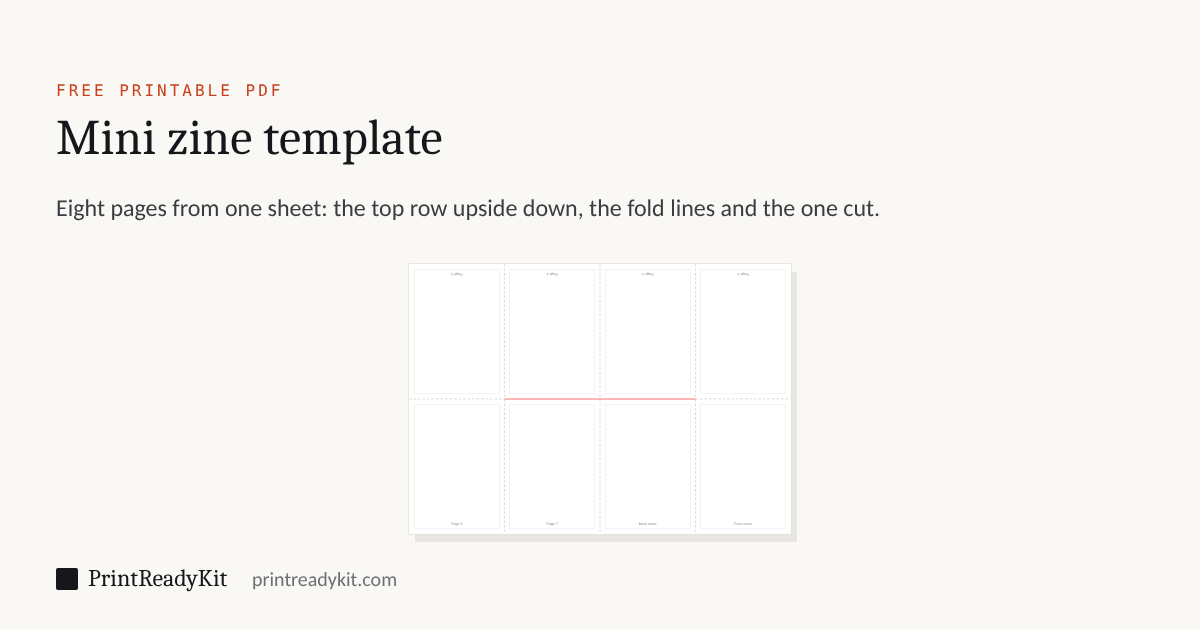
Top row upside down: 5, 4, 3, 2. Bottom row: 6, 7, 8 (Back cover), 1 (Front cover). Red line: the one cut.
Why the pages go in that order
Folded the long way with the printing outside, the bottom row faces you as pages 6, 7, 8 and 1, and the top row, now behind it, stands the right way up because it was printed upside down. The cut through the two middle panels lets the strip open into a cross of four double leaves around the spine; closed with the front cover on top, it reads 1, then 2 and 3, 4 and 5, 6 and 7, and 8 on the back. A longer booklet, with pages printed on both sides and stapled, is the booklet maker’s job.
Keeps these settings in the link. Useful for moving from a phone to the computer with the printer on it.
Frequently asked questions
How do I make a mini zine from one sheet of paper?
Print the template (or your own eight pages laid out here) on one side of an A4 or US Letter sheet, landscape. Fold it in half the long way and open it, fold it into eight panels, then fold it in half the short way and cut along the middle crease from the fold to the next crease — only through the two middle panels. Open it, fold it the long way with the printing outside, push the ends together so the cut opens, and flatten it into an eight-page booklet with the front cover on top.
Why is the top row printed upside down?
Because the top half of the sheet is folded behind the bottom half. Turned over that way, pages 2 to 5 come out the right way up only if they were printed upside down. The order on the sheet is 5, 4, 3, 2 along the top (upside down) and 6, 7, 8, 1 along the bottom: page 1, the front cover, is bottom right and page 8, the back cover, is next to it.
Can I make a zine from my own PDF?
Yes: make an eight-page PDF in any program — Canva, Google Docs, Word, InDesign — in the order you want to read it, page 1 the front cover and page 8 the back. Choose it here and the pages are put in their places, the top four turned upside down, each fitted inside its panel. The pages are copied, not turned into pictures, so the text stays sharp. Fewer than eight pages leaves the rest blank; pages after the eighth are left out.
What size is each page of the zine?
An eighth of the sheet: 74.25 × 105 mm on A4 (the size of A7) and 2.75 × 4.25 in on US Letter. Keep words and pictures a few millimetres in from the edges, because most home printers cannot print right to the edge of the sheet and the folds are never perfectly on the line; the margin setting does this for you.
Can I use pictures instead of a PDF?
Yes, up to eight pictures (JPEG or PNG), taken in the order you choose them: the first is the front cover. Each is fitted inside its panel, or fills it with the edges cut off. A drawing or a page scanned with a phone works.
Is it free, and is my file uploaded?
Free, with no sign-up. Your PDF or pictures are read in your browser and the zine PDF is made there too: nothing is uploaded, and a shared link carries only the paper, margin and fit, never your pages.
Last updated